The 2025 Amazon Seller’s Checklist: 7 Things You Must Optimize Before Running a Single Ad

Jaša Furlan
Founder & CEO

You have a fantastic product. You’ve sourced it, branded it, and shipped it to an Amazon FBA warehouse. You’re ready to make sales. Your first instinct is to open the Advertising console and “turn on the traffic.”
Please. Stop.
Running Amazon ads on a new or un-optimized product listing is the fastest way to lose money. It’s like pouring water into a leaky bucket. All that expensive traffic you’re paying for will just “leak” out because your listing isn’t ready to convert them into customers.
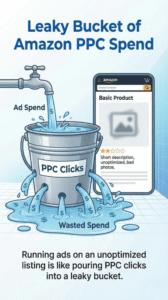
Running ads on an unoptimized listing is like pouring PPC clicks into a leaky bucket.
Your product’s success on Amazon is built on a foundation of trust and relevance. Ads are just an accelerator. Before you spend a single dime on PPC, you must build that foundation.
Welcome to the 2025 Amazon Seller’s Checklist: 7 things you must optimize to make your listing “Retail Ready” before you run ads.
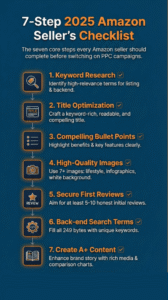
The seven core steps every Amazon seller should complete before switching on PPC campaigns.
1. Nail Your Keyword Research (The Real Foundation)
You can’t optimize a listing if you don’t know what your customers are searching for. Keyword research isn’t just for PPC; it’s the foundation of your entire listing. You need to find the high-volume, high-relevance terms your customers use to describe their problem (not just your solution).
- Find Your “Strikers”: These are your main 2-3 keywords. They are high-volume and perfectly describe your product (e.g., “large silicone spatula”).
- Find Your “Long-Tail”: These are more specific, lower-volume phrases (e.g., “silicone spatula for non-stick pans”). They often have higher conversion rates.
- Tools: Use a mix of Amazon-native tools (like the search bar autofill) and third-party tools (like Helium 10 or Jungle Scout) to build a master list.
2. Write a Title That Converts Humans and Robots
Your title is the single most important piece of SEO real estate on your listing. It needs to do two jobs at once:
- Tell the Algorithm: It must include your most important “striker” keywords (ideally near the front) so Amazon knows when to show your product.
- Tell the Human: It must be readable, build trust, and include key info.
A bad title is “Spatula – 12 Inch – Red – Silicone – Heat Resistant.” A good title is “BrandName Large Silicone Spatula (12-inch), Heat Resistant to 600°F, Seamless Non-Stick Kitchen Utensil for Baking & Cooking – Red”
3. Make Your Bullet Points Your ‘Mini Sales Pitch’
People don’t read on Amazon; they scan. Your five bullet points are your best chance to sell them. Don’t waste them on a boring list of features.
Use a “Benefit-First” structure:
- Start with the Benefit (in caps): “WON’T SCRATCH YOUR EXPENSIVE PANS”
- Explain the Feature: “Made from flexible, food-grade silicone that is gentle on all non-stick and ceramic cookware…”
- Overcome Objections: Use your bullets to answer the top 1-3 questions a customer might have. (e.g., “DISHWASHER SAFE FOR EASY CLEANUP,” “BPA-FREE & FDA-APPROVED”).
4. Get Your Images ‘Click-Worthy’ and ‘Trust-Worthy’
You can have the best keywords in the world, but if your images are terrible, no one will click.
- Main Image: This is your “click-worthy” image. It MUST be on a pure white background. It must be clear, high-resolution, and show the product clearly.
- Secondary Images: These are your “trust-worthy” images.
- Lifestyle: Show the product being used by a person. Help the customer visualize it in their own life.
- Infographics: Call out key features and benefits. Show dimensions. Compare it to other models.
- “How-to”: Show how to use or assemble the product.
5. Secure Your First 5-10 Reviews (The Social Proof)
Would you buy a product with zero reviews? Most people wouldn’t. This is the ultimate “leaky bucket” problem. You can pay for 100 clicks, but if you have 0 reviews, maybe 1 of them will convert.
Before you scale ads, you need social proof.
- Use the Amazon Vine Program. This is the safest, most effective way to get your first batch of honest reviews.
- Start with a very low-budget “Auto” PPC campaign (e.g., $10/day) just to get your first few sales, then follow up to ask for a review.
- Don’t even think about scaling ad spend until you have at least 5-10 reviews and a 4+ star average.
6. Optimize Your Back-End Search Terms
This is your “hidden” SEO. In the back-end of your listing, there’s a “Search Terms” field. This is a place to put all the keywords you couldn’t fit naturally into your title or bullets.
- What to include: Misspellings, Spanish/other language versions, and secondary long-tail keywords.
- What not to include: Commas, repeated words, and your competitors’ brand names (this is against Amazon’s policy).
7. Set Up Your A+ Content (Even a Basic Version)
This is the branded content “below the fold.” This is your chance to stop looking like a random seller and start looking like a real brand. An Amazon Seller’s Checklist for 2025 isn’t complete without it.
Even a simple A+ layout with a brand-story banner and a few modules showing off your product’s benefits will dramatically increase your conversion rate. A higher conversion rate means… you guessed it… a lower ACoS when you finally do turn on those ads.
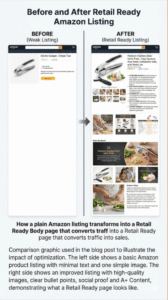
How a plain Amazon listing transforms into a Retail Ready page that converts traffic into sales.
Conclusion: Now You’re Ready to Run Ads
Look at your listing. Is it a high-converting, trust-building sales page? Or is it just a placeholder?
By completing this Amazon Seller’s Checklist, you’ve plugged the leaks in your bucket. You’ve built a strong foundation. Now when you pour that expensive PPC water (traffic) into it, it will actually fill up (convert).
It feels like a lot, because it is. Building a “Retail Ready” listing is the most important work you’ll do on Amazon.
If you’d rather have an expert team handle this entire optimization checklist—from keyword research to A+ Content design—so you can focus on your product, let’s talk. If you’re ready to build an Amazon presence that converts from day one, book a call here.